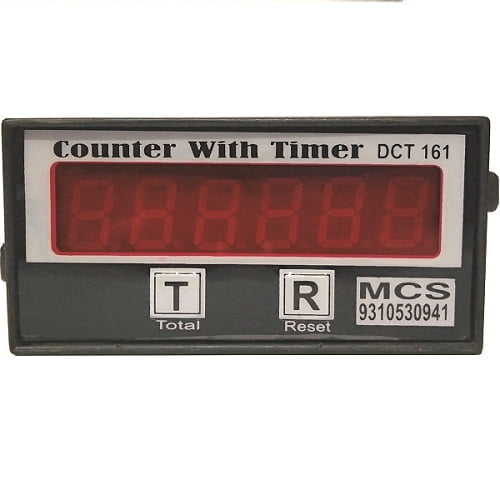
Counter with Timer

Sale!

Original price was: ₹2,200.00.Current price is: ₹1,400.00.

- +
Guaranteed Safe Checkout

10 days Returnable:

Heavy duty Industrial use 24×7 days working.

1 year warranty.

Counter with Timer

Counter with Timer is an electronic 6-digit counter totalizer with built-in machine run-hour timer. It is used to count machine strokes, production pieces, press cycles, punching cycles, machine operations or process counts, and also calculate machine running time in HH:MM:SS format.

UMA Industries supplies counter with timer devices, production counters, stroke counters, machine runtime meters, electronic totalizers, press machine counters, automation counters and customized industrial electronic instruments for power press machines, hydraulic press machines, packing machines, punching machines, production machines and industrial control panels.

This Counter with Timer normally works as a simple 6-digit counter. When the operator presses the RT button, the display shows total run time in HH:MM:SS format. The counter can be reset to zero by pressing the R button. The run-hour timer can be reset by pressing RT and R buttons together.

Counter with Timer

Technical Specifications of Counter with Timer

  • Product Name: Counter with Timer
  • Device Type: Electronic counter totalizer with run-hour timer
  • Counter Display: 6-digit counter display
  • Timer Display: HH:MM:SS format
  • Counting Function: Counts stroke, pulse, cycle or production pieces
  • Runtime Function: Calculates machine run hours
  • Run Timer Logic: Time increases in seconds when stroke is detected
  • Runtime Hold Logic: Runtime continues for 10 seconds or 12 seconds after stroke detection, as required
  • Counter Reset: Press R button to reset counter to 0
  • Timer View: Press RT button to see total run time
  • Timer Reset: Press RT and R buttons together to reset timer
  • Application: Machine production counting and runtime calculation
  • Use Area: Press machines, punching machines, packing machines, production machines and automation panels

What is Counter with Timer?

Counter with Timer is a combined production counter and machine runtime meter. It counts every valid machine stroke or input pulse and also calculates how much time the machine has actually run.

In many production machines, a normal counter only shows total production count. This device gives an additional benefit because it also records machine running time. The operator can view counter value during normal operation and can press the RT button to check total run time in HH:MM:SS format.

6 Digit Counter Totalizer

The device works as a simple 6-digit totalizer during normal display mode. Each valid input stroke increases the counter by one count. This is suitable for machines where every stroke, pulse or cycle represents one production count or machine operation.

The counter value can be reset to 0 by pressing the R button. This reset function is useful when starting a new batch, new job, new shift, new production order or new testing cycle.

Machine Run Hour Timer

The built-in timer calculates machine run hours in HH:MM:SS format. The timer starts increasing in seconds as soon as a stroke is detected. After a stroke, the controller considers the machine running for a selected time duration such as 10 seconds or 12 seconds, depending on the required machine logic.

If the next stroke comes before this duration ends, the run-time logic continues. If no stroke comes within the selected duration, the device stops adding runtime until the next stroke is detected.

Counter and Timer Display Operation

  • Normal Mode: Display shows 6-digit counter value.
  • RT Button: Press RT to view total run time in HH:MM:SS format.
  • R Button: Press R to reset the counter value to 0.
  • RT + R Buttons: Press RT and R together to reset the total run timer.

Runtime Calculation Logic

The runtime logic is specially useful for machines that do not run continuously but operate by stroke or cycle. When the controller detects a stroke, it starts adding time in seconds. The machine is considered running for the selected hold time, normally 10 seconds or 12 seconds.

Example: If the machine gives repeated strokes within the selected time window, the run timer keeps increasing. If the machine stops and no stroke is detected after the selected time, the timer stops adding runtime. This gives a more practical runtime calculation for stroke-based machines.

Applications of Counter with Timer

Power Press Machines

Power press machines use counter with timer devices to count press strokes and calculate machine runtime for production monitoring and job tracking.

Hydraulic Press Machines

Hydraulic press machines use the device to count pressing cycles and measure actual machine running time during production.

Punching Machines

Punching machines use stroke counters to count every punch and calculate machine operation time for production records.

Packaging Machines

Packaging machines use counters for packet counting, cycle counting and runtime calculation during production shifts.

Cutting Machines

Cutting machines use counter totalizers to count pieces or cuts and runtime meters to calculate operating time.

Special Purpose Machines

SPM machines use counter with timer devices for cycle counting, part counting, batch counting and machine run-hour calculation.

Production Monitoring Systems

The device is useful in production monitoring where both total count and machine runtime are required for shift analysis, operator reporting and productivity checking.

Maintenance Planning

Run-hour data helps maintenance teams understand machine usage and plan lubrication, inspection and preventive maintenance.

Why Choose Our Counter with Timer?

  • 6-digit simple counter totalizer
  • Built-in machine run-hour timer
  • Runtime display in HH:MM:SS format
  • Stroke-based runtime calculation
  • Runtime starts after stroke detection
  • 10-second or 12-second run hold logic available as required
  • RT button for runtime view
  • R button for counter reset
  • RT + R button combination for timer reset
  • Suitable for press machines and production machines

How Counter with Timer Works

  1. The machine gives a stroke signal or pulse input to the counter.
  2. The counter value increases by one for every valid stroke.
  3. At the same time, the runtime logic starts counting seconds.
  4. The controller continues adding run time for 10 or 12 seconds after stroke detection, as selected.
  5. If another stroke is detected within this time, runtime continues.
  6. If no stroke is detected after the selected time, runtime stops increasing.
  7. Normal display shows the 6-digit counter value.
  8. Pressing RT shows total run time in HH:MM:SS format.

Button Functions

R Button

The R button is used to reset the counter value. When the R button is pressed, the 6-digit counter becomes 0. This is useful for batch reset, shift reset or job reset.

RT Button

The RT button is used to view total runtime. During normal operation, the display shows counter value. When RT is pressed, the display shows run time in HH:MM:SS format.

RT + R Button Combination

When RT and R buttons are pressed together, the timer is reset. This function is useful when starting a new runtime record while keeping reset operation separate from normal counter reset.

Installation Instructions

  • Install the counter with timer in a clean and protected control panel.
  • Connect the stroke sensor, proximity sensor, limit switch or machine pulse input correctly.
  • Keep input signal wiring away from motor, contactor, solenoid and VFD wiring.
  • Use shielded cable where electrical noise is high.
  • Provide proper control supply according to the device model.
  • Mount the R and RT buttons at a convenient operator location.
  • Check counter reset and timer reset functions before production use.
  • Verify runtime logic with actual machine stroke timing.
  • Select 10-second or 12-second run-hold time according to machine requirement.

Operating Instructions

  1. Switch ON the machine and counter device.
  2. Check that the counter display is visible.
  3. Start machine operation.
  4. Confirm that every valid stroke increases the counter value.
  5. Press RT to view total runtime in HH:MM:SS format.
  6. Release RT to return to counter display mode, depending on model logic.
  7. Press R to reset counter value to 0 when required.
  8. Press RT + R together to reset total run timer when required.
  9. Record counter and runtime data according to production requirement.

Maintenance Instructions

  • Check stroke sensor or input switch regularly.
  • Inspect input wiring and terminal tightness.
  • Check R and RT buttons for proper operation.
  • Clean display surface and control panel area.
  • Verify counter accuracy with actual machine stroke count.
  • Verify runtime calculation after selected 10-second or 12-second logic.
  • Check for loose wiring if count is missing or double counting.
  • Do not modify internal logic without technical approval.

Common Problems and Troubleshooting

  • Counter not increasing: Check stroke input, sensor wiring, switch condition and input supply.
  • Counter double counting: Check sensor bounce, vibration, input filter and machine signal quality.
  • Runtime not increasing: Check whether stroke signal is reaching the controller.
  • Runtime increasing incorrectly: Check selected hold time and input signal frequency.
  • R button not resetting counter: Check button wiring and reset input.
  • RT button not showing timer: Check RT button wiring and display mode logic.
  • Timer not resetting: Press RT and R together and check both button inputs.

Industries Using Counter with Timer

  • Power press machine users
  • Hydraulic press machine users
  • Sheet metal industries
  • Automobile component manufacturers
  • Packaging machine users
  • Punching machine operators
  • Cutting machine users
  • SPM machine manufacturers
  • Production shops
  • Machine retrofitting companies
  • Control-panel manufacturers
  • Industrial automation companies

Related Products and Machine Control Devices

  1. Machine Monitoring Systems – Production counting, runtime and machine-status monitoring.
  2. Electronic Control Devices – Customized embedded control systems for industrial machines.
  3. Industrial Control Panels – Customized panels for machine control and automation.
  4. Relay Output Controllers – Digital instruments with relay output for industrial control.
  5. RS485 Modbus Instruments – Digital communication instruments for PLC and SCADA systems.

7 Powerful Benefits of Counter with Timer

  • 6-digit production counter totalizer
  • Built-in run-hour timer
  • Runtime shown in HH:MM:SS format
  • Stroke-based runtime calculation
  • 10-second or 12-second runtime hold logic
  • Separate counter reset and timer reset functions
  • Suitable for machine production and maintenance monitoring

FAQs About Counter with Timer

What is Counter with Timer?

Counter with Timer is an electronic 6-digit counter totalizer with built-in run-hour timer for counting machine strokes and measuring machine runtime.

How many digits are available in the counter?

The device has a 6-digit counter display.

What format is used for runtime?

The runtime is displayed in HH:MM:SS format.

How does the runtime start?

The runtime starts increasing in seconds as soon as a valid machine stroke is detected.

How long does it count runtime after stroke detection?

The runtime can continue for 10 seconds or 12 seconds after stroke detection, as required by the machine logic.

What happens if another stroke comes within 10 or 12 seconds?

The runtime continues increasing because the machine is considered running.

What happens if no stroke comes after the selected time?

The runtime stops increasing until the next stroke is detected.

How can I see the total run time?

Press the RT button to see total run time in HH:MM:SS format.

How can I reset the counter?

Press the R button to reset the counter value to 0.

How can I reset the timer?

Press RT and R buttons together to reset the total timer.

Can this be used on power press machines?

Yes, it is suitable for power press machines, hydraulic press machines, punching machines, packing machines and other stroke-based production machines.

Can this device be customized?

Yes, runtime hold time, input type, display logic, reset logic and machine interface can be customized according to requirement.

Do you supply throughout India?

Yes, UMA Industries supplies counter with timer devices, production counters, runtime meters and electronic control devices throughout India.

External Technical References

Business Partner and Dealer Opportunity

Machine manufacturers, press shop owners, control-panel builders, automation companies, machine-retrofitting companies, electrical contractors and industrial-equipment dealers may contact UMA Industries for business cooperation involving counter with timer devices, production counters, runtime meters, electronic control devices and customized industrial automation solutions.

Our Other Websites

  1. phmeters.in – Industrial instruments, controllers and automation products.
  2. salt-spray-chamber.in – Salt spray chambers and corrosion-test equipment.
  3. water-tank.in – Water-storage and chemical-storage tanks.
  4. YouTube Channel – Product demonstrations and technical updates.
  5. MCS Facebook Page – Product news and updates.
  6. Robotech Learning Channel – Technical tutorials and product videos.

Buy Counter with Timer

Contact UMA Industries for model selection, input sensor selection, runtime logic, reset button configuration and customized machine-control solutions. We supply Counter with Timer, 6-digit production counters, runtime meters, electronic control devices and industrial automation products throughout India.


Need help choosing? Call/WhatsApp us for industrial pH/ORP solutions.

Weight400 g
Dimensions12 × 11 × 6 cm

Reviews

There are no reviews yet.

Be the first to review “Counter with Timer”
🟢 WhatsApp Price 📞 Call Now
×

Need Price & Technical Details?

Please share your details so UMA Industries can assist you with price, technical support, availability and quotation.

Thank you. Your enquiry has been received. UMA Industries will contact you shortly.
WhatsApp for Faster Reply Skip for now We will only use your contact details to respond to your enquiry. By submitting, you agree to be contacted by UMA Industries.
Scroll to Top