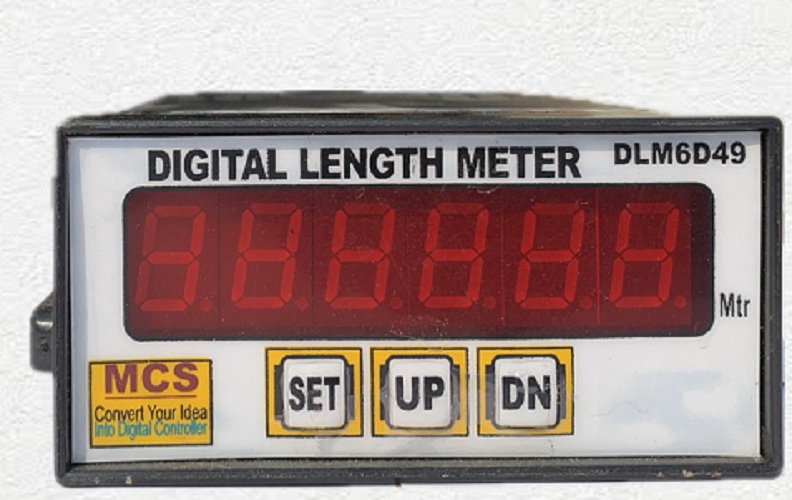
Digital Length Meter

Sale!

Original price was: ₹2,200.00.Current price is: ₹1,800.00.

- +
Guaranteed Safe Checkout

10 days Returnable:

<p>&lt;p&gt;<p&gt;<p&amp;gt;<p&gt;Heavy Duty, industrial use, 24×7 days working, 10 days Returnable, 1 year warranty.

Contact Us:- 8178668698; 9310530941; An ISO 9001-2015 Certified Company.

“`html

Digital Length Meter

The Digital Length Meter is a six-digit industrial
measuring instrument used to calculate and display the running length of
wire, cable, fabric, plastic film, paper, rubber strip, pipe, rope, sheet,
conveyor material and other continuously moving products.

The instrument works like a standard pulse counter with an additional
programmable divider. It receives pulses from a proximity sensor,
photoelectric sensor, limit switch, measuring-wheel arrangement or compatible
single-channel encoder. The incoming pulse count is divided by the selected
calibration value, and the resulting length is shown on the six-digit
seven-segment LED display.

For example, when a measuring system produces 50 pulses for every metre of
material, the divider is set to 50. The display increases by one metre after
every 50 valid input pulses.

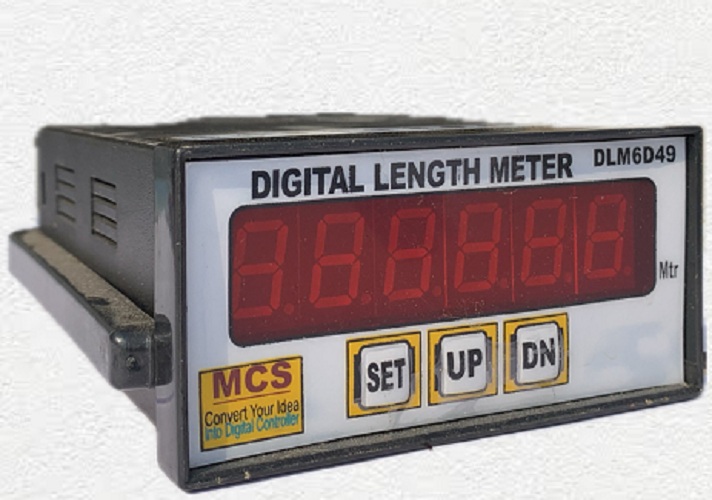
Digital Length Meter
Six-digit Digital Length Meter with programmable pulse divider, bright LED
display and front-panel SET, UP and DN controls.

Industrial Digital Length Meter

The Digital Length Meter is designed for machines where
length must be calculated from repetitive mechanical movement. A measuring
wheel, roller, gear, sprocket or rotating shaft produces a fixed number of
electrical pulses for a known length of material.

The meter counts every valid sensor pulse internally. When the accumulated
pulse count becomes equal to the programmed divider value, the main
six-digit display increases by one unit. The internal pulse accumulator then
starts counting towards the next displayed unit.

When the divider represents pulses per metre, the displayed value represents
metres. The same operating principle can be configured for centimetres,
feet, yards, pieces or another engineering unit when the mechanical
arrangement and divider are calculated accordingly.

Actual Working Principle from the Embedded Firmware

The standard embedded program uses one pulse input and one internal divider.
Each valid input pulse increases the internal pulse accumulator. The displayed
total does not increase on every pulse unless the divider is set to one.

The operating relationship is:


Displayed length = Total valid input pulses ÷ Programmed divider

Only complete divider groups are added to the main display. Remaining pulses
are retained internally and used during the next measuring cycle.

Example with Divider Set to 10

Input Pulses ReceivedDisplayed LengthRemaining Internal Pulses
1 pulse01
5 pulses05
10 pulses10
15 pulses15
20 pulses20
100 pulses100

Digital Length Meter Operation Sequence

  1. Switch ON the 220 VAC supply to the meter.
  2. The six-digit LED display restores the previously saved length value.
  3. Material movement rotates the connected measuring wheel, roller or shaft.
  4. The proximity sensor, photo sensor, limit switch or encoder generates
    electrical pulses.
  5. Every valid pulse increases the internal pulse accumulator.
  6. The meter compares the accumulated pulses with the programmed divider.
  7. When the pulse accumulator reaches the divider value, the displayed length
    increases by one.
  8. The pulse accumulator resets for the next displayed length unit.
  9. This process continues while the material moves through the machine.
  10. During power failure, the displayed length and unfinished pulse remainder
    are stored in non-volatile memory.
  11. When power returns, measurement continues from the previously stored value.

Main Features of Digital Length Meter

  • Six-digit industrial length display
  • Bright red seven-segment LED indication
  • Visible measuring range from 000000 to 999999
  • Single-channel up-counting operation
  • Programmable pulse-divider function
  • Divider range from 1 to 255 in the standard firmware
  • Counts pulses from a compatible external sensor
  • Suitable for proximity-sensor input arrangements
  • Suitable for limit-switch pulse inputs
  • Compatible with suitable photoelectric sensors
  • Compatible with suitable single-channel encoders
  • Programmable through front-panel switches
  • SET button for calibration-value adjustment
  • UP button for increasing the divider value
  • DN button for decreasing the divider value
  • DN key works as total RESET during normal operation
  • Power-failure retention of displayed length
  • Power-failure retention of partial pulse count
  • Compact 96 × 48 mm front-panel size
  • Industrial PP or ABS enclosure
  • 220 VAC operating supply
  • No battery required for value retention
  • Suitable for continuous industrial measurement

Technical Specifications

The following specifications apply to the standard
Digital Length Meter represented by the supplied embedded
program. Sensor voltage, sensor output and maximum practical pulse rate must
be matched to the meter input circuit before installation.

Technical ParameterStandard Specification
Product nameDigital Length Meter
Alternative product nameDigital Length Counter or Divider Counter
Measuring principlePulse counting with programmable division
Display range000000 to 999999
Display typeSix-digit bright seven-segment LED display
Display directionUp counting
Displayed resolutionOne displayed unit after the selected number of pulses
Standard displayed unitMetres when calibrated as pulses per metre
Decimal displayInteger display in the standard firmware
Input typeSingle pulse input
Compatible input devices Proximity sensor, limit switch, photo sensor or compatible
single-channel encoder
Divider range1 to 255
Divider adjustmentFront-panel SET, UP and DN switches
Total resetDN/RESET key during normal display mode
Power-failure memoryNon-volatile retention of displayed total and pulse remainder
Counting methodOne display increment after divider pulses are received
Reverse countingNot provided in the standard single-channel firmware
Preset relay outputNot active in this standard firmware version
Operating voltage220 VAC
Front-panel size96 mm × 48 mm
Approximate enclosure depth110 mm
Body materialPP or ABS industrial plastic
InstallationPanel mounting
Typical applicationsWire, cable, fabric, paper, film, pipe and conveyor measurement

How to Set the Divider Value

The divider determines how many sensor pulses are required to increase the
main display by one length unit.

  1. Switch ON the Digital Length Meter.
  2. Press the SET button once to enter divider-setting mode.
  3. The currently programmed divider value appears on the display.
  4. Press the UP button to increase the divider.
  5. Press the DN button to decrease the divider.
  6. The divider cannot be reduced below one.
  7. Set the required value between 1 and 255.
  8. Release the buttons and allow the setting mode to close after the
    inactivity period.
  9. The changed divider is stored in non-volatile memory.
  10. The main display then returns to the measured-length value.

During normal operation, the UP button may be used to view the current
divider value without resetting the measured total.

How to Reset the Displayed Length

  1. Confirm that the meter is in normal measuring mode.
  2. Record the existing reading before resetting when production records are
    required.
  3. Press the DN/RESET button.
  4. The displayed length returns to 000000.
  5. Release the button before restarting the machine.

The same DN button is used for reducing the divider when the meter is in
setting mode. In normal measuring mode, it resets the displayed total.

How to Calculate the Divider

The most reliable method is to determine how many sensor pulses are produced
for one metre of material.


Divider = Number of sensor pulses produced per metre

Example 1: Measuring Wheel and Encoder

A measuring wheel has a circumference of 0.50 metre and the connected sensor
generates 20 pulses for every complete wheel revolution.

One metre requires two wheel revolutions:

2 revolutions × 20 pulses = 40 pulses per metre

Set the divider to 40. The display will increase by one
metre after every 40 valid input pulses.

Example 2: One Pulse per Wheel Revolution

A measuring wheel has a circumference of 0.25 metre and produces one pulse
for every revolution.

Four revolutions are required for one metre:

1 metre ÷ 0.25 metre = 4 pulses per metre

Set the divider to 4.

Example 3: Direct Calibration

Run exactly 10 metres of material and count 600 raw sensor pulses during the
test.

Divider = 600 pulses ÷ 10 metres = 60

Set the divider to 60.

Divider Range Limitation

The standard embedded program stores the divider as an eight-bit value.
Therefore, the adjustable divider range is from 1 to 255.

When the measuring arrangement produces more than 255 pulses per metre,
one of the following methods should be considered:

  • Use a lower-resolution encoder
  • Reduce the number of sensing teeth or targets
  • Use a larger measuring-wheel circumference
  • Use mechanical pulse reduction
  • Request customised firmware with a larger divider range

Suitable Length-Sensing Arrangements

Measuring Wheel with Proximity Sensor

A metal target or toothed wheel rotates with the measuring roller. The
proximity sensor generates one pulse whenever a target passes the sensing
face.

Measuring Wheel with Rotary Encoder

A single encoder output produces multiple pulses per revolution. The
divider converts the encoder pulses into displayed metres or another
selected unit.

Photoelectric Sensor with Printed Marks

A photoelectric sensor detects regular marks, holes or reflective labels on
the moving material or measuring wheel.

Limit Switch with Mechanical Cam

A rotating cam operates the limit switch once or several times per
revolution. This arrangement is suitable for slower machines where
mechanical contact wear is acceptable.

Applications of Digital Length Meter

  • Wire drawing machines:
    Measuring the length of drawn wire collected on drums or coils.
  • Cable manufacturing:
    Measuring electrical cable during extrusion, rewinding and packing.
  • Textile machinery:
    Measuring fabric, cloth, ribbon, webbing and technical textiles.
  • Paper industries:
    Measuring paper rolls, sheets and continuous paper webs.
  • Plastic-film plants:
    Measuring film during extrusion, printing, lamination and rewinding.
  • Rubber industries:
    Measuring rubber strip, profiles, sheet and extruded products.
  • Pipe and hose manufacturing:
    Measuring plastic pipe, rubber hose, conduit and tubing.
  • Rope and twine manufacturing:
    Measuring rope, cord, thread and industrial twine.
  • Printing machines:
    Monitoring the running length of paper, film and label material.
  • Lamination machines:
    Measuring the total processed length of laminated material.
  • Coating machines:
    Recording the length of coated sheet, web or film.
  • Cut-to-length machines:
    Monitoring feed length before manual or automatic cutting.
  • Conveyor systems:
    Estimating conveyor travel from roller or shaft pulses.
  • Packaging machines:
    Measuring packing film, wrapping material and product web length.
  • Metal strip processing:
    Measuring coil strip during rolling, slitting and rewinding.

Benefits of Digital Length Meter

  • Provides continuous six-digit length indication
  • Converts ordinary sensor pulses into engineering length units
  • Adjustable for different wheel diameters and sensor arrangements
  • Reduces dependence on manual length measurement
  • Improves roll, coil and batch production records
  • Helps reduce short-length and excess-length dispatch errors
  • Retains the measured value during power failure
  • Retains incomplete divider pulses during power interruption
  • Simple three-button front-panel operation
  • Bright display visible from the machine operating position
  • Compact panel-mounted design
  • Suitable for existing and new production machines
  • Works with different compatible pulse-generating sensors
  • Custom calibration possible for each machine

Installation Guidelines

  1. Install the meter inside a clean and dry electrical control panel.
  2. Protect the display and electronics from water, oil, dust and corrosive fumes.
  3. Mount the measuring wheel so that it remains in firm contact with the material.
  4. Avoid excessive wheel pressure that could deform or stretch the product.
  5. Prevent the wheel from slipping on smooth, oily or wet material.
  6. Align the sensor correctly with the rotating target or encoder.
  7. Maintain the sensing gap recommended for the selected proximity sensor.
  8. Install the sensor bracket firmly to prevent movement caused by vibration.
  9. Keep signal wiring away from motors, heaters, contactors and VFD cables.
  10. Use shielded cable when electrical interference is present.
  11. Connect the cable shield according to the control-panel earthing practice.
  12. Confirm sensor voltage and output compatibility before connection.
  13. Provide a suitable fuse or MCB for the 220 VAC supply.
  14. Provide proper electrical earthing to the control panel.
  15. Complete field calibration using a known material length.

Length Calibration Procedure

  1. Measure an accurate reference length, preferably 10 metres or more.
  2. Ensure the measuring wheel is clean and correctly pressed against the material.
  3. Reset the Digital Length Meter to 000000.
  4. Enter the initially calculated divider value.
  5. Run the complete reference length through the machine.
  6. Compare the meter reading with the actual reference length.
  7. When the displayed length is higher than the actual length, increase the divider.
  8. When the displayed length is lower than the actual length, decrease the divider.
  9. Use the following formula for a corrected divider:


New divider = Existing divider × Displayed length ÷ Actual length

Round the calculated result to the nearest available whole-number divider
and repeat the calibration test.

Factors Affecting Length Accuracy

The electronic divider counts valid pulses consistently, but total system
accuracy depends mainly on the mechanical measuring arrangement.

  • Incorrect measuring-wheel circumference
  • Measuring-wheel wear
  • Wheel slip on the product
  • Oil, dust or water on the material
  • Improper wheel pressure
  • Material stretching under tension
  • Loose sensor or encoder coupling
  • Missed pulses at excessive speed
  • Electrical noise creating false pulses
  • Incorrect divider setting
  • Variation in product thickness
  • Mechanical vibration or roller bounce

Troubleshooting Digital Length Meter

ProblemPossible CauseRecommended Check
Display does not increaseNo pulse signal from the sensorCheck sensor supply, alignment, target and input wiring
Display increases too quicklyDivider too low or electrical noiseCheck divider, shielding, earthing and sensor stability
Display increases too slowlyDivider too high or missed sensor pulsesCheck calibration, sensor gap, target and machine speed
Measured length is higher than actualWheel slipping forward or divider too smallIncrease divider and inspect the measuring-wheel arrangement
Measured length is lower than actualMissed pulses or divider too largeReduce divider and check sensor response
Display changes while machine is stoppedElectrical noise or unstable sensor outputSeparate signal wiring and improve shielding and earthing
Divider cannot be reducedMinimum value of one has been reachedUse a different mechanical pulse arrangement if necessary
Required divider is above 255Sensor generates too many pulses per metreUse lower PPR or request customised firmware
Total value unexpectedly becomes zeroDN/RESET key was pressed in normal modeProtect the key from accidental operation
Value is not retained after power failureSupply interruption or memory circuit requires inspectionCheck power wiring and return the instrument for service

Maintenance and Safety Precautions

  • Switch OFF the 220 VAC supply before changing wiring.
  • Do not touch live terminals while the instrument is energised.
  • Use a suitable fuse or miniature circuit breaker.
  • Inspect the measuring wheel for wear and contamination.
  • Clean the wheel regularly to prevent measurement slip.
  • Check sensor mounting and sensing gap periodically.
  • Inspect the encoder coupling for looseness.
  • Protect the pulse cable from cuts, heat and chemical exposure.
  • Do not route signal and mains cables in the same conduit.
  • Recalibrate after changing the wheel, sensor, encoder or gearing.
  • Record the reading before pressing the reset button.
  • Do not apply an incompatible voltage to the pulse-input terminal.
  • Do not use this meter as a certified commercial billing instrument.
  • Use a certified measuring system where legal metrology approval is required.

Digital Length Meter in Delhi NCR

UMA Industries supplies Digital Length Meter units,
proximity sensors, pulse counters and customised measuring instruments to
wire manufacturers, cable plants, textile industries, plastic processors,
machine builders, automation companies and OEM panel manufacturers
throughout Delhi NCR and nearby industrial regions.

Industrial Areas in Delhi

  • Okhla Industrial Area
  • Bawana Industrial Area
  • Narela Industrial Area
  • Naraina Industrial Area
  • Mayapuri Industrial Area
  • Wazirpur Industrial Area
  • Mundka Industrial Area
  • Patparganj Industrial Area
  • Jhilmil Industrial Area
  • Badli Industrial Area

Faridabad and Ballabgarh

  • DLF Industrial Area
  • New Industrial Township
  • Sector 24 Industrial Area
  • Sector 25 Industrial Area
  • Sector 27A Industrial Area
  • Sector 58 Industrial Area
  • Sector 59 Industrial Area
  • IMT Faridabad
  • Ballabgarh Industrial Area
  • Prithla Industrial Area

Noida and Greater Noida

  • Noida Phase I Industrial Area
  • Noida Phase II Industrial Area
  • Noida Sectors 57 to 65
  • Noida Sectors 80 to 85
  • Surajpur Industrial Area
  • Kasna Industrial Area
  • Ecotech I Industrial Area
  • Ecotech II Industrial Area
  • Ecotech III Industrial Area

Gurugram, Manesar and Dharuhera

  • Udyog Vihar
  • IMT Manesar
  • Sector 18 Industrial Area
  • Sector 37 Industrial Area
  • Kadipur Industrial Area
  • Binola Industrial Area
  • Dharuhera Industrial Area
  • Bawal Industrial Area

Ghaziabad and Sahibabad

  • Sahibabad Industrial Area
  • Bulandshahr Road Industrial Area
  • Meerut Road Industrial Area
  • South Side GT Road Industrial Area
  • Tronica City
  • Loni Industrial Area
  • Dasna Industrial Area

Other Nearby Industrial Locations

  • Bahadurgarh Industrial Area
  • Kundli Industrial Area
  • Rai Industrial Estate
  • Sonipat Industrial Area
  • Panipat Industrial Area
  • Bhiwadi Industrial Area
  • Khushkhera Industrial Area
  • Tapukara Industrial Area
  • Neemrana Industrial Area

Related Counter and Measuring Products

External Technical Reference

Rotary encoders convert rotational movement into electrical pulse signals
that can be counted by an industrial meter. Additional technical information
about encoder operation, pulse resolution and selection is available from the

OMRON technical guide for rotary encoders
.

Frequently Asked Questions

What is a Digital Length Meter?

A Digital Length Meter is an industrial pulse-counting instrument that
divides sensor pulses by a programmable value and displays the calculated
material length on a six-digit LED display.

How does the meter calculate length?

It counts pulses from a sensor or encoder. When the pulse count reaches the
selected divider, the displayed length increases by one.

What is the display range?

The visible display range is 000000 to 999999.

What is the divider range?

The standard embedded firmware provides an adjustable divider from 1 to 255.

What happens when the divider is set to one?

The main display increases by one for every valid sensor pulse, making the
instrument operate like an ordinary digital counter.

How do I set the divider?

Press SET once, use UP to increase the value and DN to decrease it. After
the adjustment period ends, the meter returns to normal measurement.

How do I reset the measured length?

Press the DN/RESET button while the meter is in normal measuring mode.

Does the meter retain its reading during power failure?

Yes. The firmware stores both the displayed total and the incomplete pulse
remainder in non-volatile memory during power failure.

Can it be used with a rotary encoder?

Yes. A compatible single-channel pulse output from a rotary encoder can be
used after matching the encoder voltage and output type to the meter input.

Can it measure reverse movement?

No. The standard firmware is a single-channel up counter and does not
subtract length during reverse movement.

Does this model provide a relay output?

The standard firmware described here performs pulse division and length
display only. A relay-output function is not active in this firmware version.

Why is the displayed length inaccurate?

Common causes include an incorrect divider, measuring-wheel slip, incorrect
wheel circumference, material stretch, missed sensor pulses or electrical noise.

Can it display centimetres instead of metres?

Yes, when the pulse arrangement and divider are calibrated so that one
displayed increment represents one centimetre. The front-panel unit label
should also be changed accordingly.

Can the divider be set above 255?

Not in the standard embedded program. A customised firmware version is
required for a larger divider range.

What sensors can be connected?

A compatible proximity sensor, photoelectric sensor, limit switch or
single-channel pulse encoder can be used. Input voltage and output type must
be confirmed before wiring.

What is the operating voltage?

The standard Digital Length Meter operates from a 220 VAC supply.

What is the body size?

The standard enclosure has a 96 × 48 mm front panel and an approximate
depth of 110 mm.

Can it be used for commercial billing?

It is intended for industrial process and production measurement. Use a
legally approved measuring instrument when certified trade or billing
measurement is required.

Where is the Digital Length Meter supplied in Delhi NCR?

UMA Industries supplies the meter to Delhi, Faridabad, Ballabgarh,
Gurugram, Manesar, Noida, Greater Noida, Ghaziabad, Sahibabad,
Bahadurgarh, Sonipat, Bhiwadi and nearby industrial areas.

What information is required when ordering?

Provide the material name, required measuring unit, maximum length,
measuring-wheel circumference, number of pulses per revolution, machine
speed, sensor type, sensor voltage and installation location.

Order Digital Length Meter

Contact UMA Industries to order a Digital Length Meter for
wire, cable, textile, paper, plastic film, rubber, pipe, rope, printing,
coating, lamination and cut-to-length machines.

Share the material type, measuring-wheel diameter, pulses per revolution,
required unit, expected machine speed and sensor details. UMA Industries can
recommend a suitable divider setting, pulse sensor and measuring-wheel
arrangement.


Contact UMA Industries for six-digit Digital Length Meters, divider
counters, proximity sensors, rotary-encoder pulse counters and customised
industrial measuring instruments for Delhi NCR and all India.

“`


Need help choosing? Call/WhatsApp us for industrial pH/ORP solutions.

Weight400 g
Dimensions12 × 11 × 6 cm

Reviews

There are no reviews yet.

Be the first to review “Digital Length Meter”
🟢 WhatsApp Price 📞 Call Now
Scroll to Top